Save TikTok videos as MP4 in up to 1080p, or keep just the sound as MP3
SnapTik is a free TikTok downloader that works online, right in the browser you already have open. Paste the link to a clip and it comes back as an MP4 file without the watermark TikTok adds to saved videos. There is no app to install and no account to create, and the page behaves the same on a phone as on a laptop.
Saving straight from the app leaves a logo bouncing around the frame and a username stamped into the corner. That is fine for re-sharing and gets in the way of everything else: keeping a clip for yourself, sending it to someone who is not on TikTok, or dropping it into an edit. Here every TikTok video download comes from the original upload, so the picture is clean and the quality matches what the creator posted, up to 1080p. The same applies if you post your own videos on several platforms: a clip with another app’s logo in the corner tends to look out of place there.
Videos are the main job, but not the only one. Every result also includes the sound on its own, and there are separate pages for photo slideshows, stories and sounds if that is what you came for.
Open the clip in the TikTok app and tap Share, then Copy link. On a computer you can take the address straight from the browser bar instead. Both short share links and full addresses work.
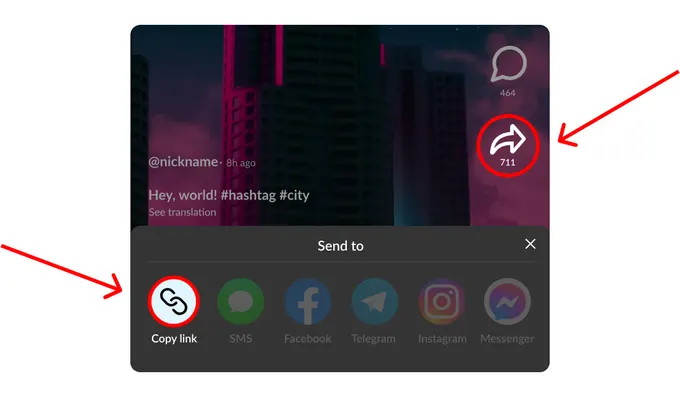
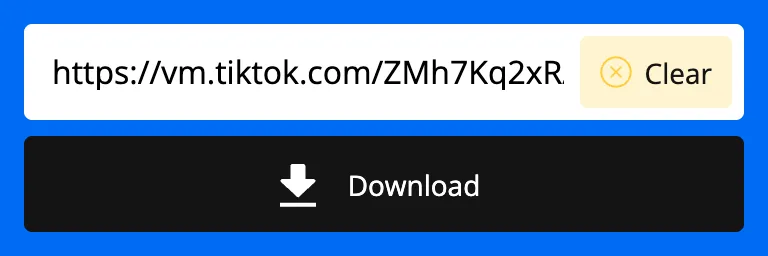
Come back to this page and put the link into the field at the top. On a phone the Paste button does it in one tap; with a keyboard, Ctrl+V or Cmd+V. Then press Download. Pasting a link that is not from TikTok, or only part of one, shows a short error message instead of a result.
After a few seconds you see the versions that exist for this clip: MP4 in the qualities the original was uploaded in, usually 1080p, 720p and 576p, plus the sound as MP3. Choose the one that suits what you are doing with it. A photo slideshow is better saved through the photo page mentioned above, which keeps every image separately.
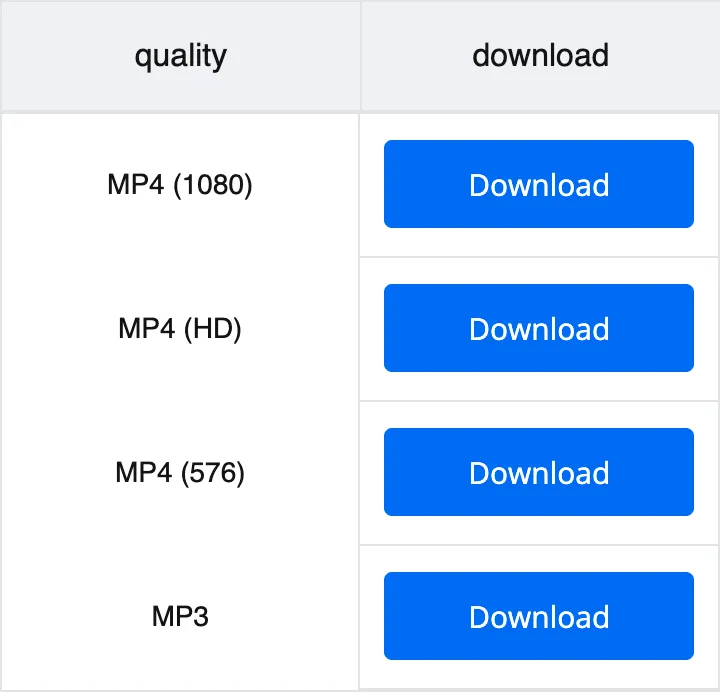
Tap Download next to the version you want. On Android the file goes to the Downloads folder, on iPhone to the Files app, on a computer to your usual downloads. For the next video, paste a new link over the old one.
The moving logo and the username in the corner are gone. You save the footage itself, ready for an edit or a big screen.
Quality follows the source: a clip uploaded in Full HD comes back in Full HD. The sound is always offered separately as MP3.
Save one video or fifty. Nothing is counted in the background and no feature waits behind a paywall.
No account, no email, no profile. Open the page, paste a link and save the file. Nothing to remember next time either: bookmark the page and it is ready whenever you need it.
It runs in Chrome, Safari, Firefox or Edge. An online TikTok video downloader needs nothing on your device but the browser.
Files are prepared on our servers, so an older phone finishes about as quickly as a new one on the same connection.
Open this page in Safari and paste the link. The video lands in the Files app, and from there you can move it to Photos.
Any browser works, Chrome included. The MP4 goes to the Downloads folder and shows up in the gallery within a few seconds. If you would rather keep downloads on a memory card, change the download location in your browser settings once.
Copy the address from the browser bar on tiktok.com and paste it here. The file saves to your downloads folder. MP4 opens in the standard players on both systems, so nothing extra is needed to watch it.
Yes. The file is built from the original upload rather than from the version the app shows you, so there is no watermark moving across the frame and no username in the corner. If you have saved something straight from TikTok before and found a logo on it, this is the difference you will notice first.
Yes, completely. There is no paid tier, no trial and no limit on how many videos you download.
You can. Copy the link in the TikTok app, open this page in Safari and paste it in. The file goes to the Files app, and from there you can move it into Photos if you want it in your camera roll. Older versions of iOS may ask you to allow the download once.
The same steps apply and the file lands in your Downloads folder. Most Android galleries pick it up automatically within a few seconds. If yours does not, opening the file from Downloads once is usually enough for it to appear with your other videos.
The best one the source offers. TikTok compresses uploads on its side, so the ceiling is set by the person who posted the clip. A video uploaded in Full HD comes back in Full HD, and smaller versions such as 720p and 576p are offered alongside it.
Yes. Next to the MP4 versions you are offered the sound as an MP3, which is useful when you are after a track or a voice clip rather than the footage. It opens in any player on your device.
No. Only clips that are publicly visible can be processed, because the page fetches them the same way any visitor would. If a video is private, has been taken down, or sits behind an account that blocks you, there is nothing for the downloader to reach.
Usually the link is incomplete or points to a profile rather than a video. Copy it again with Share and Copy link and paste it without extra text around it.
Saving a clip for your own viewing is generally fine. Republishing someone else’s work, passing it off as your own or using it commercially is a different matter and depends on the rights of whoever made it. Treat a saved video the way you would treat any other content you did not create.
Long videos and high resolutions take more time to prepare and transfer, and a slow connection adds to that. If a download stalls, paste the link again: the file is rebuilt from scratch rather than resumed.
Disclaimer: SnapTik operates independently and is not endorsed by TikTok or ByteDance Ltd. Our service helps users download TikTok videos from public accounts for personal use. We respect copyright and encourage users to credit original creators when sharing content.