Save TikTok videos in HD, up to 1080p, or keep only the sound as MP3
Not affiliated with TikTok or ByteDance.
When a clip is available in Full HD, the list offers it in 1080p, so you are not stuck with a small preview-sized copy.
No moving logo and no username in the corner. You keep the footage itself, ready to watch, edit or archive.
Next to 1080p you usually see 720p and 576p, which take less space on a phone that is running out of storage.
Video results also offer the audio track as an MP3 file, handy for music, voice clips and sound effects.
No account, no email and no paid tier. Open the page, paste a link and save the file.
It runs in Chrome, Safari, Firefox or Edge on phones, tablets and computers. The browser is all you need.
This TikTok downloader saves videos in HD, in the best quality available for each clip. Paste a link to a clip and you get MP4 files in the qualities that exist for it, usually 1080p, 720p and 576p, plus the sound as a separate MP3. Everything happens in the browser: there is no app to install and no account to create.
Clips saved this way come without the TikTok watermark, so the picture stays clean and as sharp as the chosen quality allows. That matters most on a big screen, in a video editor, or when you crop a vertical clip for another format, where every missing pixel shows.
One thing worth knowing before you start: HD here means the best version available for the clip, not something sharper than what was filmed. If a clip was filmed in 720p, no downloader can turn it into real 1080p, and this one does not pretend to. Looking for the sound alone? The TikTok sound downloader is built for that, and photo slideshows have their own page too.
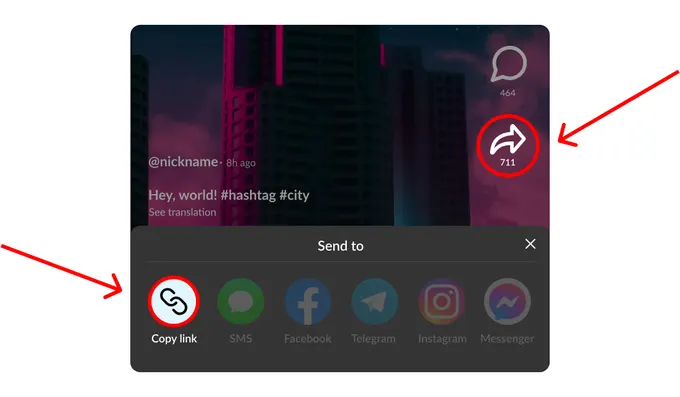
Open the clip in the TikTok app, tap Share and then Copy link. On a computer, copy the address from the browser bar on tiktok.com. Short share links and full addresses both work, as long as the link leads to a single video rather than a profile.
Put the link into the field at the top of this page. On a phone the Paste button does it in one tap; with a keyboard, use Ctrl+V or Cmd+V. If the link is not from TikTok or got cut off while copying, you see a short message asking you to check it.
You get a list of the versions available for that clip. The 1080p MP4 is the sharpest one, the line marked HD is 720p, and MP3 keeps only the sound. Tap Download next to the one you want, and the file goes to your usual downloads folder.
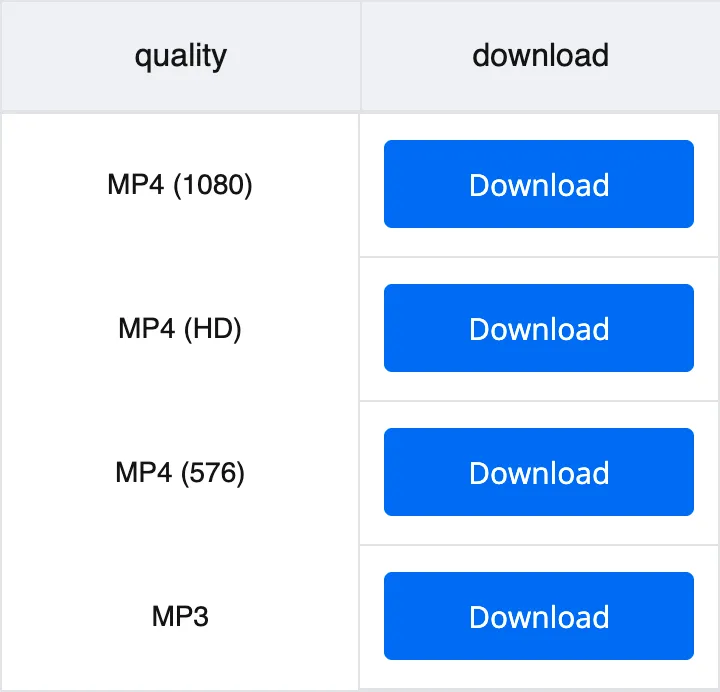
The list you get after pasting a link shows only what exists for that clip. Here is what each option is good for.
| Format | Quality | Best for |
|---|---|---|
| MP4 | 1080p (Full HD), when the clip has it | Watching on a TV or laptop, editing, keeping a sharp copy for later |
| MP4 | 720p, marked HD in the list | Phone screens and sending the clip in a messenger at a smaller size |
| MP4 | 576p | Saving storage space or downloading over a slow connection |
| MP3 | Sound only | Music, voiceovers and sounds you want to play without the picture |
Footage cut into a montage or a reaction video loses detail with every export. Starting from 1080p leaves room for cropping and zooming without the result turning soft.
A copy that looks fine on a phone can turn blurry when stretched across a TV. The Full HD file holds up much better when you cast it or play it from a USB stick.
Download a few tutorials or travel clips before you lose signal. If space is tight, the 576p version keeps them watchable at a fraction of the size.
Creators often lose the original files after posting. Saving your videos back in the best quality TikTok kept gives you a clean copy without the watermark for a portfolio or a backup.
Step-by-step videos are easier to follow when you can pause on a sharp frame. HD keeps small captions, ingredient lists and on-screen text readable.
A clean MP4 can go into a messenger or an email as a file, with no link to open. Pick 720p when the chat app limits file size, 1080p when it does not.
Open this page in Safari, paste the link and pick the quality. Safari saves the video the same way it saves any other file you download.
Chrome or any other browser works. Pick the quality, tap Download, and the MP4 is saved to your phone like any other file from the browser.
Copy the address of the video from the browser bar on tiktok.com and paste it here. The file goes to your downloads folder, and from there you can keep it wherever you like.
Copy the link in the TikTok app with Share and Copy link, open this page in Safari and paste it into the field. Pick the 1080p version if it is listed, then tap Download. Safari saves the video like any other download.
Yes. Every quality on the list, 1080p included, comes without the moving TikTok logo and without the username in the corner.
Because not every clip has a Full HD version. The list shows only the qualities available for this particular video, and a clip filmed in 720p cannot become real 1080p. In that case the top line of the list is the best quality you can get.
It marks the 720p version of the video. It is lighter than 1080p and still looks sharp on a phone, so it is a good choice when you mostly watch on a small screen or want to send the file to someone.
Yes. Next to the MP4 versions you are offered the audio as an MP3 file. If sounds are all you need, the separate sound downloader page does the same with a layout made for audio.
A photo post is not a video, so there is no HD MP4 to save. Instead you get the images and the sound separately, and every picture keeps its own size.
Yes. There is no paid plan and no signup, and you do not need to install anything.
No. Only clips that anyone can open on TikTok can be processed. Private or deleted videos cannot be downloaded in any quality.
Disclaimer: SnapTik operates independently and is not endorsed by TikTok or ByteDance Ltd. Our service helps users download TikTok videos from public accounts for personal use. We respect copyright and encourage users to credit original creators when sharing content.
