Paste a link and keep the sound of a public TikTok as an MP3 file
Not affiliated with TikTok or ByteDance.
You get the audio track as a separate MP3 file, without the picture. It takes far less space than the video.
Slideshows made of pictures have a sound too. Paste a link to a photo post and the sound comes as its own file next to the images.
The same list also offers the clip as MP4, so you can grab the sound and the video from one link without going back to TikTok.
Paste the link, press Download and pick MP3. There are no extra settings to figure out and nothing to convert by hand.
No account, no email and no paid tier. The converter is free every time you use it.
The converter lives in the browser, so you skip desktop software and audio apps. Any up-to-date browser on a phone or a computer will do.
A song stuck in your head, a funny voice line, a sound you want under your own video: on TikTok they all live inside clips. This TikTok to MP3 converter takes the link to a clip and gives you its sound on its own, as a regular MP3 file you can keep on your phone or use in a video editor on a laptop.
As a TikTok audio downloader it works the same way for videos and for photo posts. When you paste a link to a slideshow, you get the pictures and the sound as separate files, so you can keep only the audio. When you paste a link to a regular video, the list shows the MP4 versions of the clip and the MP3 next to them, and you choose what to save.
The MP3 is simply the sound of the clip, and no tool can make it sound better than what is in the clip itself. If you want the picture as well, the HD video downloader is made for that, and photo slideshows have their own page too.
Open the video or photo post in the TikTok app, tap Share and then Copy link. On a computer, copy the address from the browser bar on tiktok.com. The link has to lead to a single post, not to a profile or a sound page.
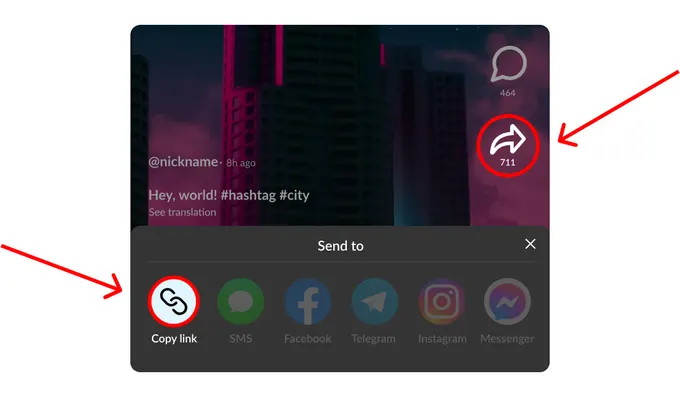
Back on this page, paste the link into the converter field and press Download. The same field takes links to videos and to photo posts, so there is nothing to switch. A link that is broken or not from TikTok gets a short note asking you to check it.
In the list of results, tap Download next to the MP3 line. For a photo post, look for the sound below the pictures. The file goes to your usual downloads folder, ready to play or to drop into an editor.
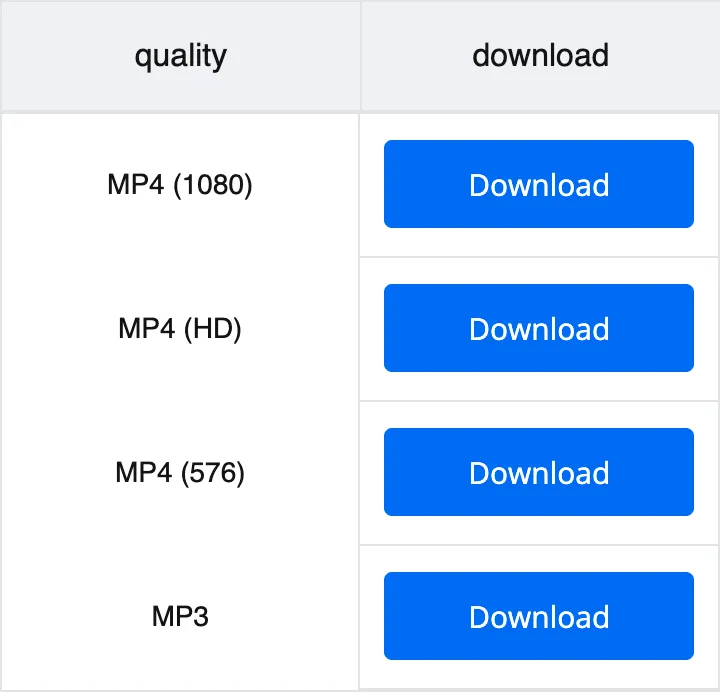
After you paste a link, the list shows what exists for that post. Here is how the sound file compares with the video versions.
| Format | What is inside | Best for |
|---|---|---|
| MP3 | Sound only | Music, voice clips, ringtones and audio for your own videos |
| MP4 | Video with sound, up to 1080p when the clip has it | Watching or editing the clip with the picture |
| MP4 | 720p, marked HD in the list | A lighter video copy for a phone or a messenger |
Cut the catchy part of a trending song and set it for calls or alarms. How a custom sound is added depends on your phone and its system version.
Save a voiceover or a sound effect and use it in CapCut, iMovie or any other editor. Remember that music and voices belong to their authors, so check the rules before you post a video with someone else’s sound.
Long talks, explainers and study clips often work just as well without the picture. As MP3 files they play with the screen off and take little space, which helps on a commute or a flight.
Open this page in Safari, paste the link and tap Download next to MP3. Safari saves the MP3 the same way it saves any other file you download.
Chrome or any other browser works. Tap Download next to MP3, and the file is saved to your phone like any other file from the browser.
Copy the address of the post from the browser bar on tiktok.com and paste it here. The MP3 goes to your downloads folder, and from there you can keep it wherever you like.
Yes. There is no paid plan and no signup, and you do not need to install anything. Paste a link and save the MP3 as many times as you need.
Copy the link in the TikTok app with Share and Copy link, open this page in Safari and paste it into the field. Tap Download next to the MP3 line. Safari saves the file like any other download.
Yes. Open this page in Chrome or another browser, paste the link and choose MP3. The browser saves the file to your phone like any other download.
Yes, on Windows and Mac alike. Copy the address of the post on tiktok.com, paste it here and save the MP3. It goes to your downloads folder like any other file.
Yes. When you paste a link to a photo slideshow, the pictures and the sound come as separate files, so you can save only the audio.
The MP3 holds the sound of the clip, nothing more. A converter cannot add quality that is not in the clip, so a song recorded on a phone in a noisy room will sound the same in the file.
Disclaimer: SnapTik operates independently and is not endorsed by TikTok or ByteDance Ltd. Our service helps users download TikTok videos from public accounts for personal use. We respect copyright and encourage users to credit original creators when sharing content.